Table of Contents

Changing Your Password
Please be sure to change your temporary password after logging in for the first time.
You can change it by clicking "Change Password" in the upper right corner of the screen.
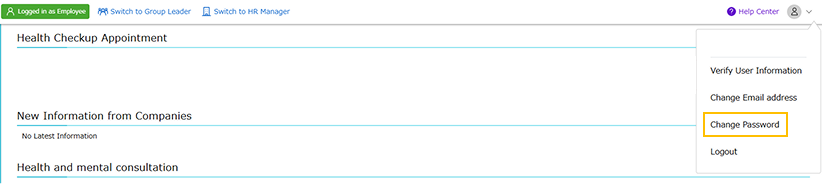
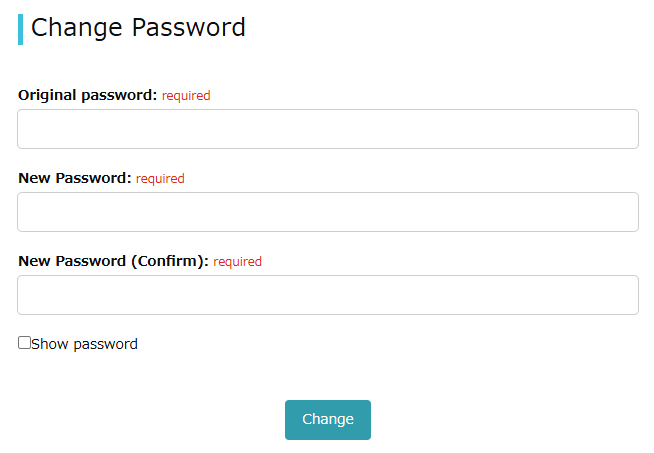
Enter your current password and your new password into the two fields, then click the "Save Changes" button.
*Password requirements: 10 or more characters / A combination of numbers and letters or symbols.
If You Forgot Your Password
Click "Forgot your password?" on the login screen, specify the email address to receive the password reset email, and complete the procedure.
*Please note that the reset email will not be sent to any email address other than the one registered in mediment.
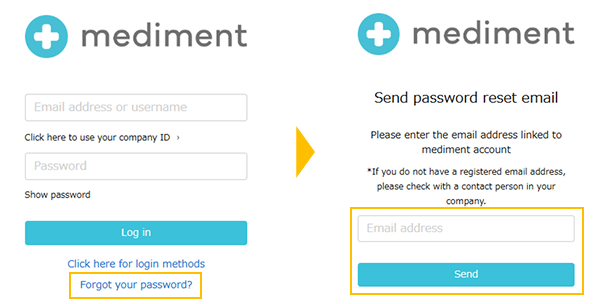
Please check the email you receive and follow the instructions to reset your password.
この記事は役に立ちましたか?
それは素晴らしい!
フィードバックありがとうございます
お役に立てず申し訳ございません!
フィードバックありがとうございます
フィードバックを送信しました
記事の改善におけるご協力ありがとうございます。