Table of Contents

Logging in with User ID / Password
Access the login page (https://mediment.jp/login/).
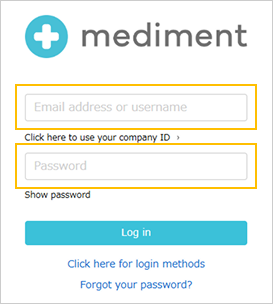
Enter the User ID and password issued to you in advance via email, then click "Log in".
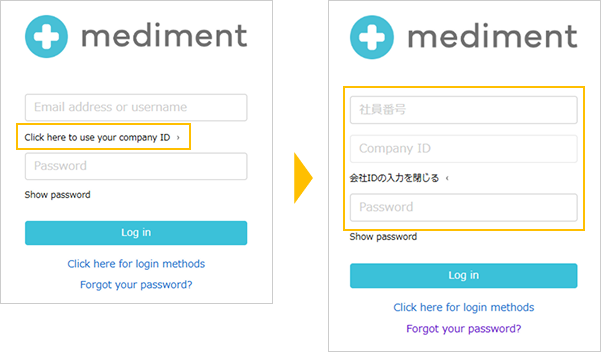
Click "Click here if you use a Company ID" on the login page, enter your Employee ID, Company ID, and Password, then click the "Log in" button.
*Note: Only users who have a Company ID stated in their account guidance email can log in using this method.
Logging in with Single Sign-On (SSO)
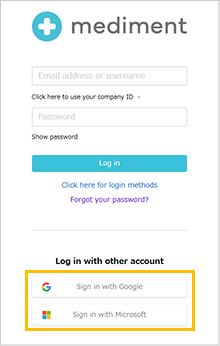
【Log in with a Google or Microsoft Account】
You can log in using either "Log in with Google" or "Log in with Microsoft."
【Log in from an External System】
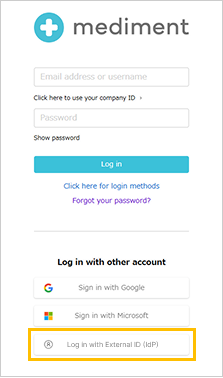
If your company has provided you with a dedicated system login URL, open the login page using that URL and select "Log in with External ID (IdP)."
If only one IdP is registered, you will be directed straight to its login screen. Enter your credentials to authenticate.
If two or more IdPs are registered, an IdP selection screen will appear. Select your provider to proceed to its login screen.
この記事は役に立ちましたか?
それは素晴らしい!
フィードバックありがとうございます
お役に立てず申し訳ございません!
フィードバックありがとうございます
フィードバックを送信しました
記事の改善におけるご協力ありがとうございます。